 tokenlog.
Your LLM token usage, one convenient view.
tokenlog reads your Anthropic, OpenAI and Gemini organizations, adds up what they cost, and tells you where the month is heading before the invoice does. Copilot usage too, if your GitHub account has it.
Sign in with GitHub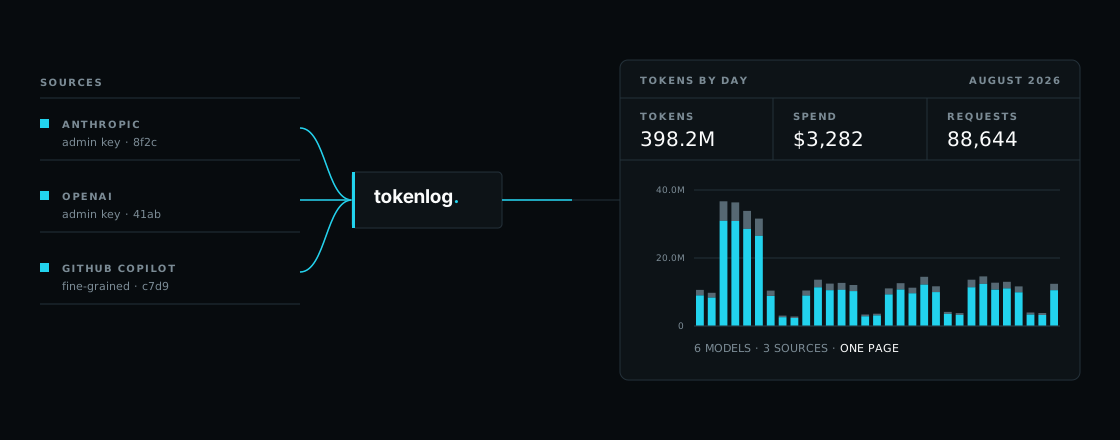
What it measures
- Tokens
- In, out, and cached — by model, project, and key, so a cost spike has a name.
- Spend
- Each provider's own numbers, added up in one place instead of three billing pages.
- Headroom
- How close each key is to its rate limits right now, not just what it burned yesterday.
How it works
Four steps to get started:
- 01
Connect a source
Paste an organization admin key for Anthropic or OpenAI, or a read-only service account for Gemini. tokenlog calls the usage endpoint once to prove the key works, then encrypts it with AES-256-GCM before it reaches the database. Only usage and cost endpoints are ever called.
- 02
Back-fill, then keep up
The first sync reads 90 days of history so there is something to compare against on day one. Refreshes once a day or at the press of a button. More reporting, less tabbing.
- 03
Read the month
The dashboard opens on a sentence, not a wall of tiles: what you have spent, where the month lands at this pace, and how that compares to your budget or to last month.
- 04
Hear about it first
Set a monthly ceiling and thresholds. Each one fires once, recorded here and POSTed to a webhook if you want it elsewhere. Rate-limit probes, opt-in, show how much headroom each key has left right now.
Sign-in is GitHub OAuth, which proves who you are and nothing more — provider keys are added separately, and shown only by their last four characters afterwards.
Works with your token savers
They cut the tokens. tokenlog shows the savings.
Caveman, RTK and Ponytail make your coding agent leaner at the source. tokenlog sits at the other end, where the spend lands: it reads what your providers actually bill, across every key in the organization.
Savers handle
- Shorter agent replies, with code and commands kept intact
- Compressed command output before the model reads it
- Less code written in the first place
tokenlog handles
- What your providers actually bill, not an estimate
- Every key in the organization, in one view
- Monthly budgets with alerts before the ceiling
- Rate-limit headroom for each key
- Copilot usage alongside the API spend
Keep the savers you like. tokenlog is how you see whether they paid off.
Caveman, RTK and Ponytail are independent projects, not affiliated with tokenlog. Names belong to their respective owners.